A Minecraft Minecart Unloader is a redstone device that automatically removes items from a Minecart with Chest and transfers them into a storage system. Using hoppers, comparators and powered rails, the unloader detects when a minecart arrives, stops it while items are extracted and then releases it once it is empty. This makes it ideal for automated farms, storage systems and rail transport networks.
What is a Minecart Unloader?
These are the instructions for how to Minecraft unloading a minecart. This build is used to load a minecart to enable the use of a transport system for your items. This is joined onto the end of a minecart track and then the minecart will be unloaded into a hopper and then a chest.
This works by using a comparator, the minecart will come up to the powered rail if the minecart contains items the comparator will send a signal to the Redstone torch and un-power the rail causing the minecart to stop on the powered rail.
The powered rail will be placed over a hopper, while the minecart is over the hopper the items will start to empty out of the minecart. When the minecart is empty the comparator will send the signal and the Redstone torch will re-activate and the minecart will continue on its way.
This is a great way to transport different items to different places.
Materials needed to build a Minecart Unloader
These are the ingredients and recipes that you will need to make this Minecraft unloading a minecart. Please ensure that you have all of the ingredients before you start your build.
| Item | Picture | Amount |
|---|---|---|
| Stone block |  | 3 |
| Repeater | 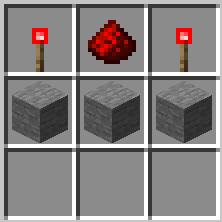 | 1 |
| Comparator | 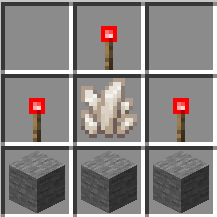 | 1 |
| Hopper | 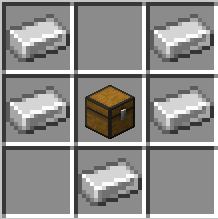 | 1 |
| Chest | 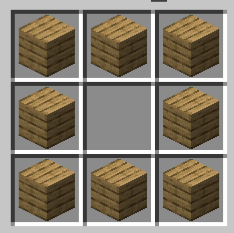 | 1 |
| Redstone torch | 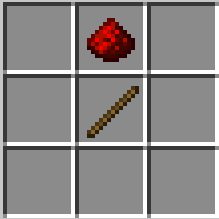 | 1 |
| Powered rails | 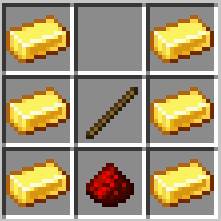 | Depends on size |
| Rails | 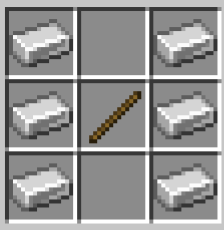 | Depends on size |
- Hopper – you will need to craft a chest first.
- Repeater and comparators – you will need to make Redstone torches first.
How to build a Minecart Unloader
Here we will explain in detail how to build this Minecraft unloading a minecart. Please follow the instructions carefully.
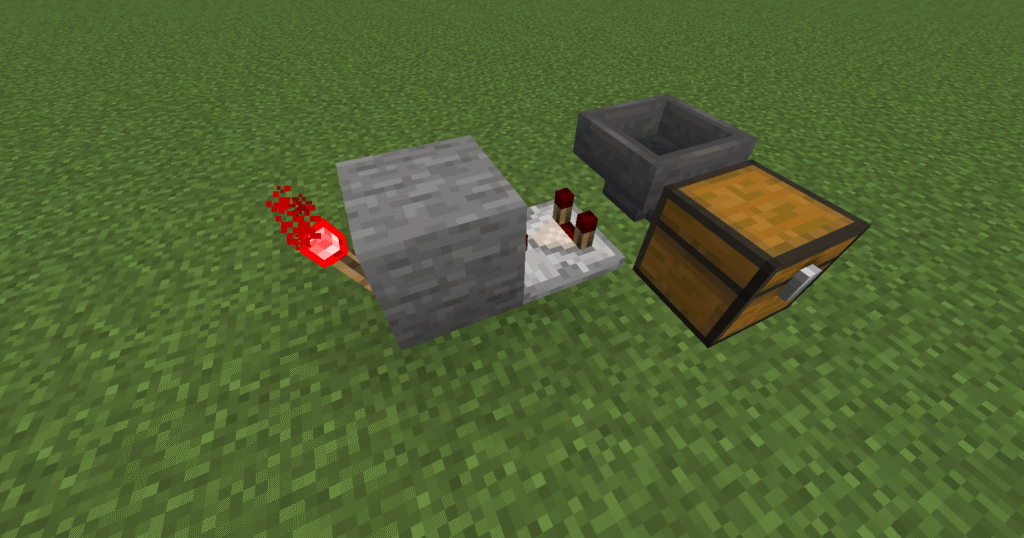
- First of all lets place a stone block down.
- Next place a redstone torch on to the back of the stone block.
- Place a comparator with the two prongs facing away from the stone block.
- Next place a chest down to the side as shown in the picture.
- Place a hopper next to the comparator that leads into the chest, you will need to crouch to place this.
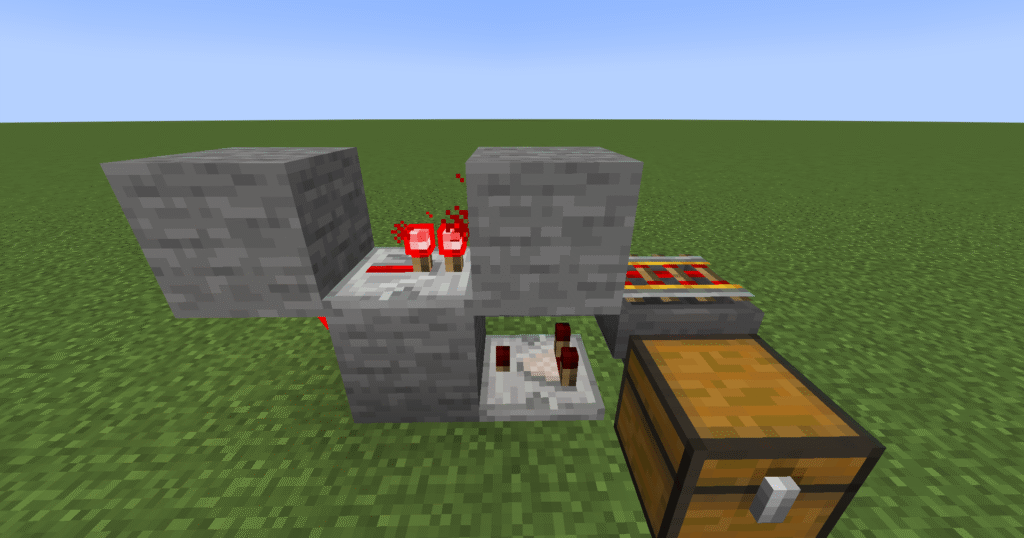
- Now, place a repeater on top of the stone block facing the comparator.
- Attach 2 stone blocks to the repeater on each side (you will have to crouch to do this).
- Finally in this section place a powered rail on top of the hopper, again you will need to crouch to do this.
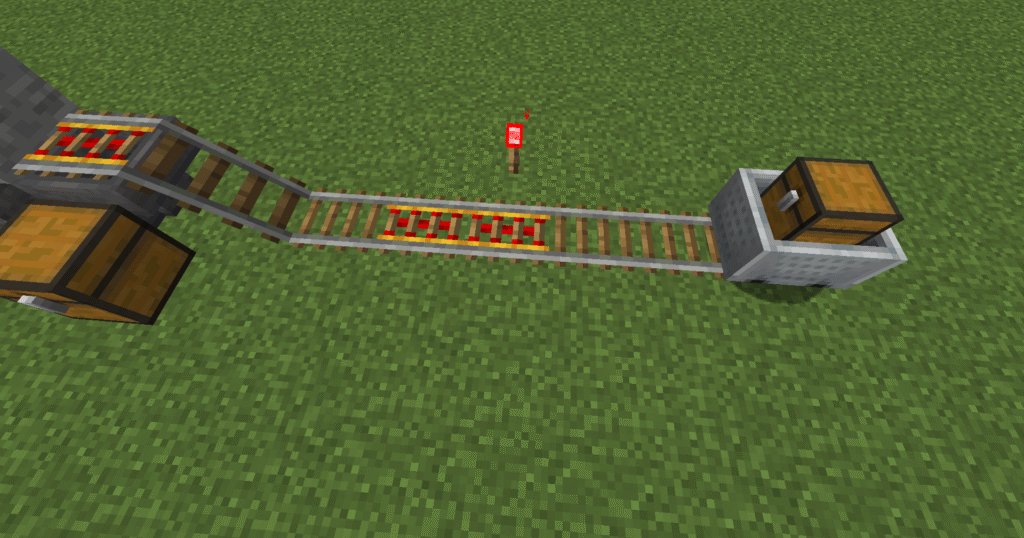
- Next place the rails down connecting to the powered rail on top of the hopper and then a minecart.
- Where you have placed powered rails, make sure to place redstone torches to power them.
- Ensure that a standard rail is placed next to the powered rail on the hopper.
Hints and tips for building a Minecart Unloader
Common problems and solutions
- Minecart not stopping on hopper – This will happen if you have the comparator the wrong way round. The comparator works in this build by checking if the minecart is empty and sending a signal to the Redstone torch whether it needs to be powered or not. If the comparator is the wrong way around it cannot check the minecart.
- Minecart stopping on hopper- When your minecart remains over the hopper when it is empty it means that you have your repeater the wrong way round or you have omitted it from the build. Ensure that the arrow is pointing towards the minecart.
Additions to the build
An addition to this build would be to add a sorter to it. This would mean that a large number of items can be sent in the minecart and then automatically sorted into separate chests. A sorter is one of the most versatile builds in the Minecraft world. They can be added to many builds for better efficiency and speed of sorting items.
Minecraft Minecart Unloader FAQ
What is a Minecraft Minecart Unloader?
A Minecraft Minecart Unloader is a redstone device that automatically removes items from a Minecart with Chest and transfers them into a storage system.
How does a Minecart Unloader work?
A Minecart Unloader uses hoppers to extract items from a chest minecart. Redstone components detect when the minecart arrives, stop it while the items are unloaded, and release it once it is empty.
Can I build a Minecart Unloader in Survival Mode?
Yes. Minecart Unloaders can be built in Survival Mode using common materials such as hoppers, comparators, powered rails, redstone dust and chests.
Does a Minecart Unloader work in Java and Bedrock Edition?
Most Minecart Unloader designs work in both Minecraft Java Edition and Bedrock Edition, although some redstone timings may vary slightly between versions.
What type of minecart can be unloaded?
This build is designed for a Minecart with Chest, allowing items to be transferred automatically into hoppers, chests or storage systems.
Why won’t my minecart stop at the unloader?
Check that the powered rail is correctly connected to the redstone circuit and that the comparator is detecting items in the chest minecart. Incorrect wiring is the most common cause.
Why aren’t items being unloaded from the minecart?
Make sure the hopper is positioned directly beneath the chest minecart and that there is enough space in the connected storage system to receive the items.
Why won’t the minecart leave after unloading?
The minecart may still contain items, or the redstone release mechanism may not be activating correctly. Check the comparator, powered rail and redstone connections.
Can I connect a Minecart Unloader to a storage system?
Yes. Minecart Unloaders are commonly connected to chests, item sorters and automated storage systems to organise resources automatically.
Can I use a Minecart Unloader with automatic farms?
Yes. They are ideal for crop farms, mob farms, bamboo farms and other automated builds where items need to be transported and collected automatically.
What are the benefits of using a Minecart Unloader?
Some of the main benefits include:
- Automatic item collection
- Reduced manual resource handling
- Easy integration with storage systems
- Support for automated farms
- Efficient rail-based transportation
- Expandable automation networks
Is a Minecart Unloader worth building?
Absolutely. A Minecart Unloader helps automate resource collection and storage, making it an essential component of large-scale farms, storage systems and transportation networks.